
How to Build a Live Table Tennis Scores App Using a Table Tennis API
Learn how to build a live table tennis scores application with fixtures, current point scores, completed sets, REST polling, WebSocket events, caching, reconnect recovery and production-safe architecture.
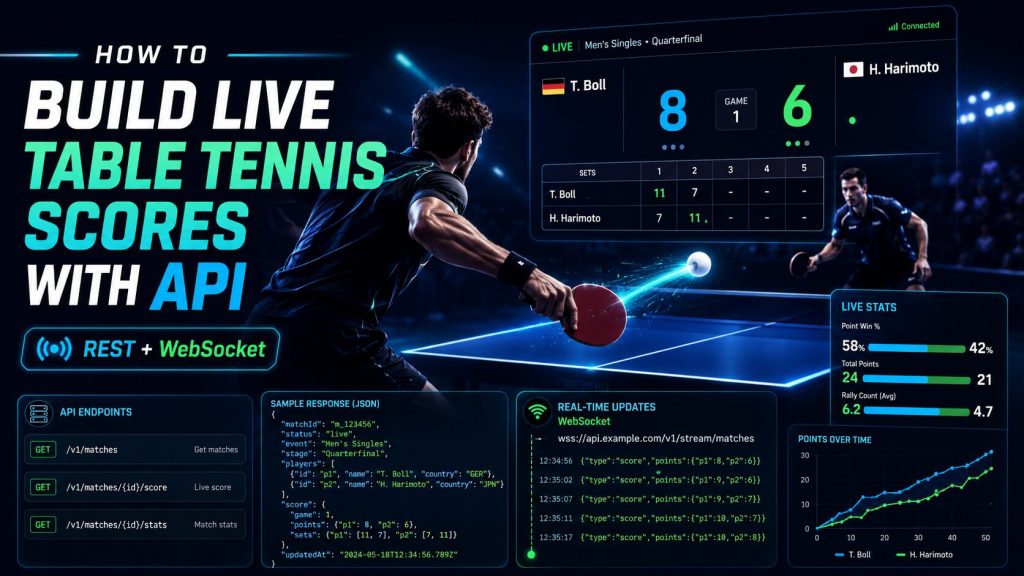
How to Build a Live Table Tennis Scores App Using a Table Tennis API
Build a practical live table tennis scores application with fixtures, current point scores, completed sets, REST polling, WebSocket events, shared caching, duplicate protection and reconnect recovery.
A live table tennis scores app looks simple until you build one for real match conditions. The interface needs more than two player names and a final result.
Your application must understand the difference between the current point score and the match set score, preserve completed sets, recognise live and exceptional match states, prevent duplicate events from corrupting the score and recover cleanly when a real-time connection disappears.
This tutorial starts with a straightforward REST implementation and then adds WebSocket streaming for products that need point-by-point delivery.
1. Choose the Right Architecture
The provider API should normally sit behind your own backend. That keeps private credentials away from browser users and gives you one place to manage caching, quotas, errors and live event distribution.
Web / Mobile Client
        ↓
Your Backend API
        ↓
Shared Cache / Match State
        ↓
Table Tennis REST API

Real-time path:

Table Tennis WebSocket API
        ↓
Connection Worker
        ↓
Validation + Deduplication
        ↓
Shared Match State
        ↓
Your WebSocket / SSE Layer
        ↓
Clients
| Layer | Responsibility |
|---|---|
| Frontend | Displays schedules, scores, sets and match status. |
| Your backend | Protects credentials, validates requests and normalises data. |
| Shared cache | Lets many viewers reuse the same current match state. |
| REST API | Provides fixtures, complete state, results and historical resources. |
| WebSocket | Delivers supported incremental live events. |
2. Create One Normalised Match Model
Your frontend should receive one consistent object whether the match is scheduled, live or completed.
{
  "match_id": "match_tt_48291",
  "status": "live",
  "scheduled_at": "2026-08-07T13:00:00Z",
  "tournament": {
    "id": "tournament_211",
    "name": "Example International Open"
  },
  "round": "quarterfinal",
  "best_of": 7,
  "player_a": {
    "id": "player_tt_101",
    "name": "Player A"
  },
  "player_b": {
    "id": "player_tt_204",
    "name": "Player B"
  },
  "sets": {
    "player_a": 2,
    "player_b": 1
  },
  "set_history": [
    { "set": 1, "player_a": 11, "player_b": 7 },
    { "set": 2, "player_a": 9,  "player_b": 11 },
    { "set": 3, "player_a": 11, "player_b": 6 }
  ],
  "current_set": {
    "number": 4,
    "player_a": 8,
    "player_b": 6
  }
}
Point score
The score inside the current set, for example 8–6.
Set score
The number of sets won by each player, for example 2–1.
Set history
The final score of every completed set.
Match status
Scheduled, live, completed, walkover, retired or another official state.
3. Keep the API Key on Your Backend
Put the production key in an environment variable or a proper secret store. The public frontend should call your own application endpoint.
TABLE_TENNIS_API_KEY=YOUR_PRIVATE_API_KEY
TABLE_TENNIS_API_BASE=https://api.example.com/v1
const API_BASE = process.env.TABLE_TENNIS_API_BASE;
const API_KEY = process.env.TABLE_TENNIS_API_KEY;

async function tableTennisRequest(path) {
  const response = await fetch(`${API_BASE}${path}`, {
    headers: {
      Authorization: `Bearer ${API_KEY}`,
      Accept: 'application/json'
    }
  });

  if (!response.ok) {
    const body = await response.text();

    throw new Error(
      `Table Tennis API error ${response.status}: ${body}`
    );
  }

  return response.json();
}
4. Load Fixtures for the Selected Date
A useful score screen normally contains scheduled, live and completed matches for one date.
GET /v1/table-tennis/matches?date=2026-08-07
Create a backend helper
async function getMatchesByDate(date) {
  const params = new URLSearchParams({ date });

  return tableTennisRequest(
    `/table-tennis/matches?${params}`
  );
}
Group matches by state
function groupMatches(matches) {
  return {
    live: matches.filter(
      match => match.status === 'live'
    ),
    scheduled: matches.filter(
      match => match.status === 'scheduled'
    ),
    completed: matches.filter(
      match => match.status === 'completed'
    )
  };
}
Keep special statuses such as walkover and retirement intact. Do not force every finished fixture into a generic completed state.
5. Render the Live Match Clearly
Example live card
Example International Open · Quarterfinal
Player A 2 · Player B 1
Set 4: 8–6 · Status: LIVE
<article class="live-match-card" data-match-id="">
  <div class="match-meta">
    <span class="tournament"></span>
    <span class="status"></span>
  </div>

  <div class="player-row player-a">
    <span class="player-name"></span>
    <span class="sets-won"></span>
    <span class="points"></span>
  </div>

  <div class="player-row player-b">
    <span class="player-name"></span>
    <span class="sets-won"></span>
    <span class="points"></span>
  </div>

  <div class="set-history"></div>
</article>
function renderMatchCard(element, match) {
  element.dataset.matchId = match.match_id;

  element.querySelector('.tournament').textContent =
    match.tournament.name;

  element.querySelector('.status').textContent =
    match.status.toUpperCase();

  element.querySelector('.player-a .player-name').textContent =
    match.player_a.name;

  element.querySelector('.player-b .player-name').textContent =
    match.player_b.name;

  element.querySelector('.player-a .sets-won').textContent =
    match.sets.player_a;

  element.querySelector('.player-b .sets-won').textContent =
    match.sets.player_b;

  const currentSet = match.current_set;

  element.querySelector('.player-a .points').textContent =
    currentSet ? currentSet.player_a : '';

  element.querySelector('.player-b .points').textContent =
    currentSet ? currentSet.player_b : '';
}
6. Preserve Every Completed Set
Showing only 2–1 in sets removes useful match context. Store the score of every completed set.
function renderSetHistory(container, setHistory) {
  container.replaceChildren();

  for (const set of setHistory) {
    const item = document.createElement('span');

    item.textContent =
      `${set.player_a}-${set.player_b}`;

    container.appendChild(item);
  }
}
Set 1: 11–7
Set 2: 9–11
Set 3: 11–6
Current Set 4: 8–6
7. Start the MVP With REST Polling
REST polling is easy to implement and works well when a small refresh delay is acceptable.
let timer;

async function refreshLiveMatches() {
  const response = await fetch('/api/live-table-tennis');

  if (!response.ok) {
    throw new Error(
      `Live endpoint failed: ${response.status}`
    );
  }

  const payload = await response.json();
  updateLiveScoreUI(payload.data);
}

function startPolling() {
  stopPolling();
  refreshLiveMatches();

  timer = setInterval(() => {
    if (document.visibilityState === 'visible') {
      refreshLiveMatches().catch(console.error);
    }
  }, 15000);
}
8. Add a Shared Backend Cache
Thousands of viewers should not create thousands of identical upstream requests for the same match.
Many viewers
     ↓
Your live endpoint
     ↓
Shared cache
     ↓
Controlled upstream refresh
async function getCachedLiveMatches() {
  const cached = await cache.get('live_table_tennis');

  if (cached) {
    return cached;
  }

  const payload = await tableTennisRequest(
    '/table-tennis/matches/live'
  );

  await cache.set(
    'live_table_tennis',
    payload,
    CACHE_TTL
  );

  return payload;
}
9. Add WebSocket for Point-by-Point Updates
REST asks for the current state. WebSocket can deliver supported events as the state changes.
{
  "action": "subscribe",
  "channel": "table_tennis_match_events",
  "match_ids": [
    "match_tt_48291"
  ]
}
{
  "event_id": "event_tt_90018",
  "match_id": "match_tt_48291",
  "type": "point_won",
  "sequence": 73,
  "set_number": 4,
  "player_id": "player_tt_101",
  "score": {
    "player_a": 8,
    "player_b": 6
  }
}
Prefer the resulting score supplied by the event instead of blindly incrementing your local value.
10. Process Set-Won Events Separately
{
  "event_id": "event_tt_90027",
  "match_id": "match_tt_48291",
  "type": "set_won",
  "set_number": 4,
  "winner_id": "player_tt_101",
  "set_score": {
    "player_a": 11,
    "player_b": 8
  },
  "match_sets": {
    "player_a": 3,
    "player_b": 1
  }
}
function applySetWon(match, event) {
  match.set_history.push({
    set: event.set_number,
    player_a: event.set_score.player_a,
    player_b: event.set_score.player_b
  });

  match.sets = {
    player_a: event.match_sets.player_a,
    player_b: event.match_sets.player_b
  };

  match.current_set = null;

  return match;
}
11. Protect Against Duplicate Events
A replayed point must not change the score twice.
processed_events

event_id        UNIQUE
match_id
sequence
event_type
processed_at
async function processEvent(event) {
  const exists = await eventStore.has(event.event_id);

  if (exists) {
    return;
  }

  await eventStore.save(event);
  await updateMatchState(event);
}
Sequence numbers help detect gaps
Last processed sequence: 72
Incoming sequence: 74
Sequence 73 was expected, so the safest action is to reload the current state through REST.
12. Recover After a WebSocket Disconnect
WebSocket tells you what changed while connected. REST tells you what the match looks like now.
13. Handle Walkovers and Retirements Explicitly
Walkover
Show the official state and winner where supplied. Do not invent unplayed scores.
Retirement
Preserve the real score and retired-player context.
Delayed
Keep the fixture visible with its official status.
Cancelled
Do not represent cancellation as a normal competitive result.
{
  "status": "retired",
  "winner_id": "player_tt_101",
  "retired_player_id": "player_tt_204",
  "sets": {
    "player_a": 2,
    "player_b": 1
  },
  "current_set": {
    "number": 4,
    "player_a": 8,
    "player_b": 6
  }
}
14. Add Rankings, Statistics and H2H at the Right Frequency
| Data | Recommended refresh approach |
|---|---|
| Point score | Live REST polling or WebSocket events. |
| Fixtures | Refresh around schedule changes. |
| Rankings | Refresh after a new supported ranking release. |
| Statistics | Refresh after relevant matches complete. |
| Head-to-head | Refresh after the players meet again. |
This keeps the pre-match experience rich without wasting live request capacity on slower-changing resources.
15. Show When the Live Data Was Updated
<div class="live-state">
  <span class="live-badge">LIVE</span>
  <span class="last-update">
    Updated 4 seconds ago
  </span>
</div>
Prefer the upstream event or update timestamp where available. Your frontend render time alone does not prove that the underlying sports data is fresh.
16. Test the Failure Cases
| Test | Expected behaviour |
|---|---|
| Scheduled → Live | Match moves into live view without duplication. |
| Point event | Current score updates once. |
| Duplicate event | Score does not change twice. |
| Set completed | Set enters history and total sets update. |
| Sequence gap | Application reloads authoritative state. |
| WebSocket disconnect | UI shows reconnecting and state is reconciled. |
| Walkover | No fabricated score history appears. |
| Retirement | Real score and official state remain visible. |
| Match completed | Final state is confirmed and high-frequency updates stop. |
17. Monitor the Full Data Path
- Upstream REST success rate
- WebSocket connection state
- Time since the last heartbeat
- Time since the last live event
- Sequence gaps
- Duplicate-event count
- Provider event time → backend receipt time
- Backend receipt time → frontend display time
end_to_end_freshness =
frontend_rendered_time - provider_event_time
18. Production Checklist
- Keep permanent provider credentials on the backend
- Confirm competition coverage before launch
- Use stable match, player and tournament IDs
- Use shared caching for common live state
- Do not open one provider WebSocket per visitor
- Store unique event IDs
- Track sequence values where supported
- Implement reconnect backoff
- Reconcile state through REST after disconnects
- Preserve completed set history
- Handle walkovers and retirements explicitly
- Show data freshness to users
- Monitor stale live data
- Respect request and connection limits
- Confirm storage and display licensing
REST or WebSocket?
| Requirement | REST | WebSocket |
|---|---|---|
| Load fixtures | Recommended | Usually unnecessary |
| Initial match state | Recommended | Not a replacement |
| Point-by-point updates | Polling required | Push where supported |
| Set-won updates | Polling required | Push where supported |
| Historical data | Recommended | Not intended for archive queries |
| Disconnect recovery | Reload authoritative state | Reconnect and resubscribe |
Common Mistakes to Avoid
Exposing credentials
Never ship permanent private credentials to the browser.
Polling per viewer
Use shared backend state for popular matches.
Blind score increments
Prefer authoritative resulting scores from the data feed.
No deduplication
Replayed point events must not affect the score twice.
Ignoring exceptional states
Walkovers and retirements need explicit handling.
No reconnect strategy
Network interruptions are normal in real-time systems.
Frequently Asked Questions
Can I build the app with REST only?
Yes. REST polling is a practical starting point when a modest refresh delay is acceptable.
When should I add WebSocket?
Add it when supported point and set events need to reach the interface without waiting for the next polling cycle.
Should the browser call the provider directly?
Not when doing so exposes permanent private credentials. A backend also gives you caching and quota control.
How do I prevent duplicate point updates?
Persist unique event IDs, track sequence values where available and make event processing idempotent.
What should happen after WebSocket disconnects?
Reload complete state through REST, reconnect, authenticate and resubscribe.
How often should I poll live scores?
Follow the final provider’s freshness guidance and your plan limits. There is no universal polling interval.
Build Your Live Table Tennis Scores App
Start with fixtures and complete REST state. Add shared caching and then introduce WebSocket streaming when your product needs point-by-point updates.
Build Cricket Products With Reliable API Data
Access live scores, fixtures, ball-by-ball updates, statistics, odds, predictions and historical cricket data through one developer-friendly API.
Get API Access